My Featured Work
This page showcases my Learning Design along with supporting artifacts such as student sample slides, backward design planning, and media products. Together, these elements demonstrate how I thoughtfully design instruction that integrates technology to enhance student engagement, understanding, and overall learning outcomes.
Section 1: Learning Design
This section showcases my learning design for a technology-integrated ELA lesson, including the backward design process, student examples, and my media product.
BWD Learning Activity
Title of the Learning Activity:
Digital Story Retelling using Google Slides of Because of Winn Dixie
Learning Context:
This activity is designed for a 3rd class and focuses on retelling the story Because of Winn-Dixie by identifying the beginning, middle, end, and the theme or message of the story.
Description of the activity:
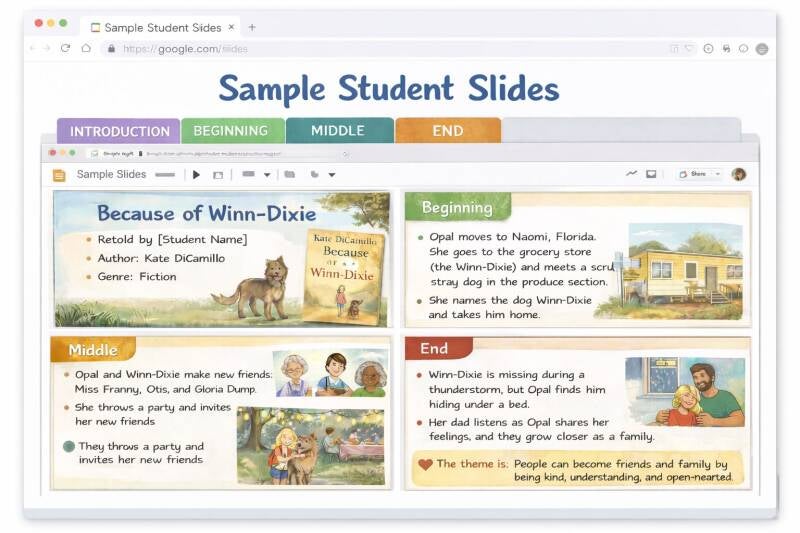
In this activity, students are creating a digital retelling of Because of Winn-Dixie using Google Slides. After we read the story and discuss the story, students will use a graphic organizer ( story map) in pairs to break the story into beginning, middle, and end, and identify the theme/ moral of this story. They will then work independently to create their own slide show displaying their individual ideas onto 3-5 slides that must include: Into, retelling of events (B/M/E), and a final slide explaining the theme with supporting details from Because of Winn Dixie.
The goal of this assignment is to help my students understand a story's structure and theme while also giving them freedom to present their own individual thinking using tech. I would model how to create the slides first, then students would work independently to complete their own presentation. This activity supports both ELA standards and ISTE standards by combining reading comprehension with digital communication.
What I love about this activity is that students are not just answering comprehension questions and being forced to participate in something they don't want to do-- they will create something that shows their understanding in a more meaningful way, allowing them to then discuss this story, exploring story comprehension in their own meaningful/engaging way.
Section 2: Sample Student Slides
This is an example of what a completed student Google Slides presentation looks like for this activity.
Slide Examples
Section 3: Backward Design
This backward design outlines the content standard, ISTE standard, learning outcomes, and assessment plan for this activity.
Backward Design Document
Section 4: Media Product
I selected Google Slides as the technology tool for this activity because it is accessible, easy to use, and allows students to express their individual creativity and understanding in a visual and organized way. Google Slides supports student voice by giving each learner the freedom to design their own presentation while still meeting the same learning goals. It transforms a traditional retelling activity into a meaningful digital product that students can be proud of and share with others.
Media Product — Student Artifact


Create Your Own Website With Webador